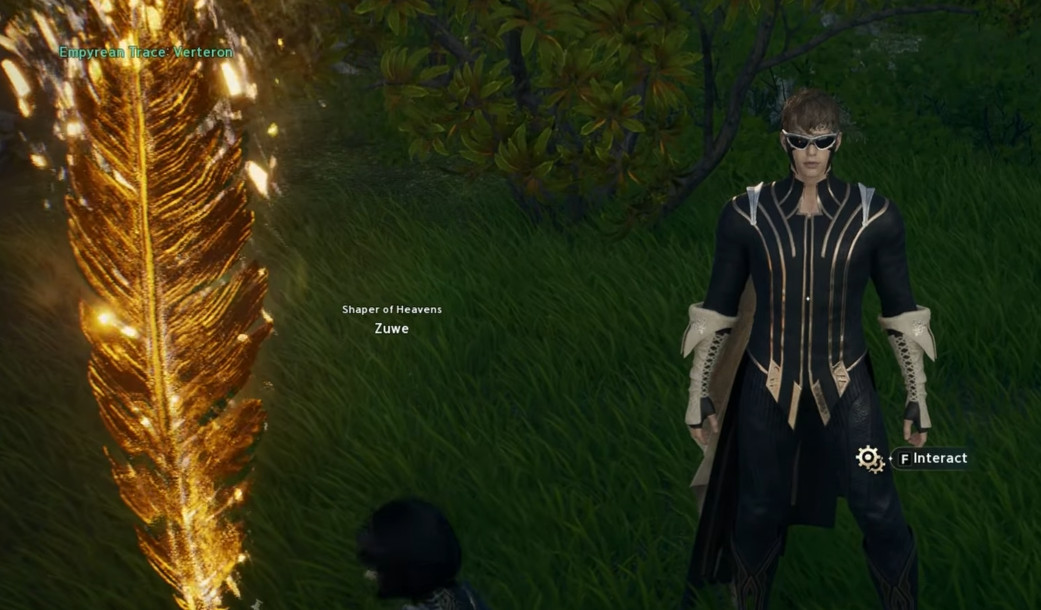
Empyrean Trace Feathers are important exploration collectibles in Aion 2 that help players strengthen their characters through the Monolith Resonance system. Scattered throughout the open world, these glowing collectibles provide progression rewards that can include permanent stat improvements, skill-related resources, and useful upgrade materials.
Knowing where to find these feathers and when to use them can make character progression more efficient, especially during the early stages of the game.
Where to Find Empyrean Trace Feathers
Empyrean Trace Feathers begin appearing on the world map after players leave the introductory area and enter the main leveling zones. Their locations depend on the faction you choose.
Elyos: Explore Verteron and Eltnen for available feather locations.
Asmodians: Search Altgard and Morheim for faction-specific collectibles.
World Exploration: Check your map for feather markers and investigate the surrounding terrain when you arrive.
Some collectibles may require additional exploration, including checking elevated areas or locations that are not immediately visible from the main path. Collecting feathers while completing quests can save time compared with returning to every region later.
How to Use Empyrean Trace Feathers
Collecting feathers is only the first step. To turn them into meaningful progression rewards, players must unlock the Empyrean Monolith system through the main story.
Follow these steps to get started:
Progress Through the Main Quest: Continue the story until the Empyrean Monolith feature becomes available, reportedly around level 16.
Visit Your Faction Monolith: Travel to the appropriate Monolith in your faction’s territory.
Open the Resonance Interface: Interact with the Monolith to view the available progression levels and requirements.
Use Your Collected Traces: Contribute the required resources to increase Resonance and unlock the associated rewards.
Check Your Progress: Review the next milestone to determine how many additional collectibles you need.
Monolith progression can provide valuable character improvements, making Empyrean Trace collection worthwhile even when you are focused primarily on leveling.
Tips for Collecting Feathers More Efficiently
A planned collection route can reduce unnecessary travel and help you avoid missing important locations.
Collect nearby feathers while completing main and regional quests.
Explore the marked area carefully instead of assuming every feather is directly beside the map icon.
Keep track of completed locations to avoid revisiting the same areas unnecessarily.
Check your Monolith’s current requirements before spending time collecting additional feathers.
Review the map after major exploration sessions to identify remaining collectibles.
Players should also check their current game version for any changes to Monolith requirements, reward values, or collection mechanics.
Improve Your Aion 2 Progression
Empyrean Trace Feathers are one part of a broader progression system that includes equipment upgrades, skill development, quests, and challenging PvE activities. Combining exploration with regular character development can help you build a stronger character without wasting time on repetitive trips.
For players seeking additional assistance with their in-game goals, Z2U.com offers an Aion 2 Boosting Service category where available services can be explored and compared. Reviewing service descriptions, seller information, and applicable terms can help players decide whether a listing suits their progression needs. Always check the game’s current policies before purchasing third-party services.
By collecting Empyrean Trace Feathers as you explore and investing them in the Monolith at the appropriate stage, you can make steady progress toward stronger character stats and valuable rewards in Aion 2.